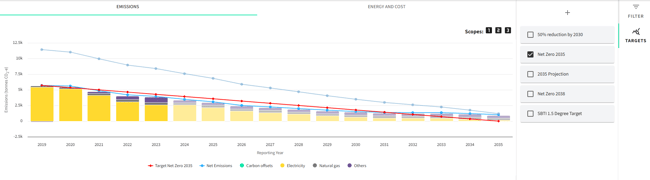
Targets
Targets formalise your sustainability goals, providing a benchmark and timeline for emissions reduction. You can define short-term milestones or long-range strategies.
Setting a Target
-
Go to the Targets tab and Click the “+” icon
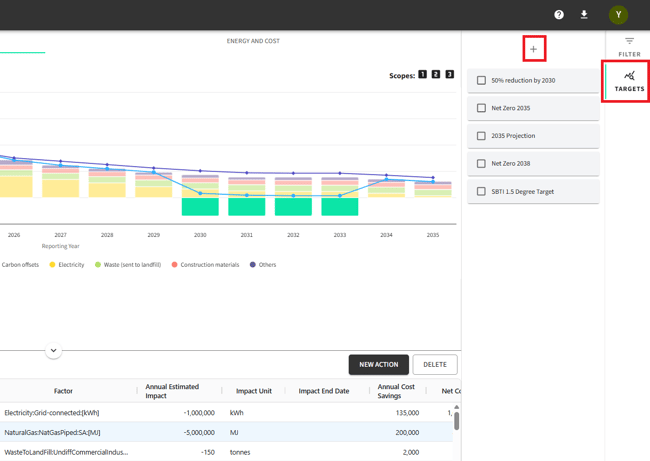
-
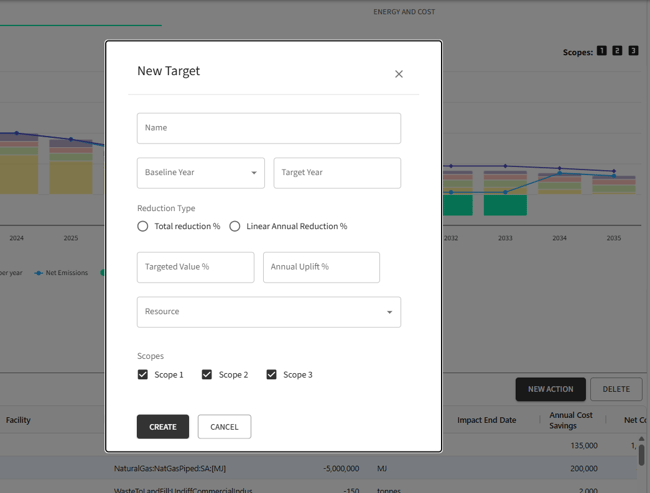
Complete the form
-
Name - e.g., “30% Reduction by 2030”
-
Baseline Year - your reference point
-
Target Year - when you want to achieve your goal
-
Reduction Type:
-
Total Percentage Reduction %: Define overall reduction goals; good for long-term planning.
-
Linear Annual Reduction %: Set consistent yearly decrease rates; good for steady, predictable reductions. A relevant option to be selected if setting SBTi Target.
-
-
Targeted Value - amount of reduction or final emissions level
-
Annual Uplift % - if planning a gradual increase in reduction effort
-
Resource – select between a full list of resources
-
Scopes – include or exclude scopes 1, 2, 3
-
Note:
-
When a Target is selected, the system calculates the predominant resources based on emissions in the baseline year. These top three resources are displayed individually on the chart, while all other resources are grouped under "Others."
-
All resources remain available and can still be filtered; this behaviour only affects the default grouping for visual display.
Tracking Progress
- The Targets dashboard provides a visual representation of your progress. It compares current emissions trajectory against your set targets.
- As circumstances change, you may need to adjust targets. You can edit existing targets or create new ones to reflect updated goals or strategies.