
What We Offer
Trellis allows for data integration in two ways:
Direct API Access
-
On-demand access to your data
-
Ability to integrate Trellis data with your systems
-
Customisable data queries and filtering
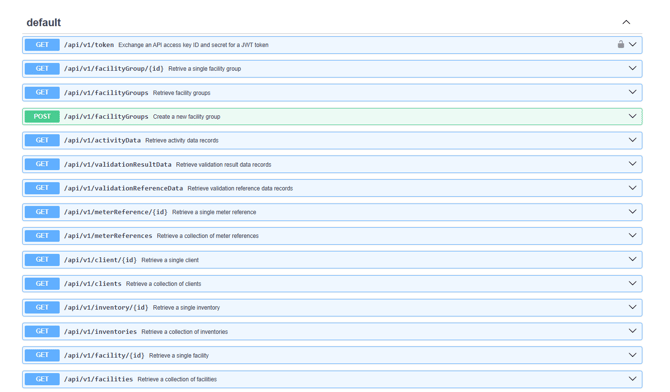
Provides endpoints that give users read access to the data in their Trellis account. Data are exposed and accessible for users to run their own queries on immediate live data. Suitable for users with developed data infrastructure teams that can leverage the data extracted by Trellis for advanced operations.
Scheduled Data Exports
-
Regular automated data exports
-
Pre-configured data delivery based on standardised formats
-
Ideal for periodic reporting needs
One of the delivery methods for the exports is SFTP Scheduled Data Push. Providing customised flat file export that is saved to a user’s file sharing destination of choice on a periodic basis. The standard report spreadsheet structure is compiled and pushed to a designated endpoint (such as an S3 bucket or file share folder) on schedule. This can be used by external BI tools to create custom reports and visualisations according to each user’s in-house needs and capabilities.
What is an API?
An Application Programing Interface (API) is a sophisticated data communication system that enables different software applications to interact seamlessly. In our context, it facilitates secure, standardised communication and data exchange between Trellis and your systems.
-
Protocol: Uses HTTP protocols to send requests and receive structured responses
-
Authentication: Access key details are exchanged for JSON Web Tokens (JWT) used to identify authenticated requests.
-
Request and response format: Implements JSON: API 1.0 standard, which defines a consistent structure for requests and responses.
How Can these Services Help You?
Some of our customers use our API to:
-
Extract data from Trellis
-
Combine it with data from other sources
-
Create interactive dashboards in tools like Power BI
-
Display the results on their public website
Common Use Cases
-
Creating custom reports and dashboards
-
Integrating Trellis data with your business intelligence tools
-
Automating data collection for analysis
-
Building custom applications using Trellis data
Available Data Access Options
You can access:
-
Organisation structure details
-
Meter references
-
Activity and emissions data
Getting Started
-
Choose Your Service
-
API access for real-time integration
-
Scheduled exports for regular reporting
-
-
Request Access
-
Contact our team to discuss your needs
-
For information on accessing the APIs and technical guidelines, visit the Trellis API technical documentation (only available to logged in users)
-
Create API keys on your profile page
-
-png.png?width=670&height=335&name=image-20251209-001946%20(2)-png.png)
-
Secure Authentication System - API requests are authenticated using JWT tokens. Tokens have a limited lifetime and are obtained by exchanging an API key ID and secret.
-
Data Access Controls - Connections to the Trellis API are are encrypted and authenticated using a strong protocol (TLS 1.3), a strong key exchange (ECDHE_RSA with P-256), and a strong cipher (AES_128_GCM)
Need More Information?
Contact our support team to discuss:
-
Specific data requirements
-
Integration options
-
Technical capabilities
-
Pricing and access levels