
Trellis' Estimations feature enhances report accuracy by filling in missing data using a structured calculation. It allows users to apply an estimation methodology at the meter level, which can be toggled on or off.
How to Enable or Disable Estimations
-
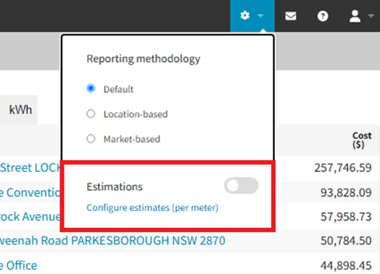
Estimations can be activated or deactivated using a toggle located in the Reporting Settings tab.
-
To enable estimations for a meter, it must first be configured.
Configuring Meters for Estimation
-
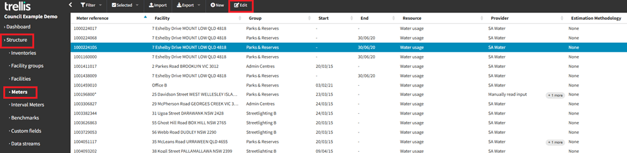
Clicking ‘Configure Estimates’ directs users to the ‘Meters’ page.
-
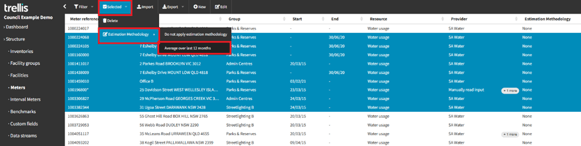
Users can select one or more meters and apply the estimation methodology.
-
Estimations can only be enabled or disabled for meters that have been configured.
Note: Reports are updated overnight. Any changes to estimations will be reflected the following day.
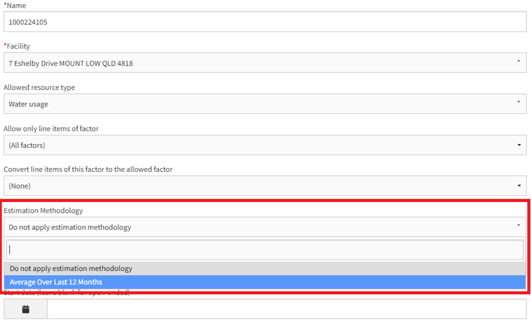
Configuring one meter at a time
Bulk selecting meters to configure
Data Coverage Wheel
Before Enabling Estimations
-
Elapsed: The time elapsed from the start of the selected date range to current date.
-
Complete: The overall data completeness percentage across all meters.
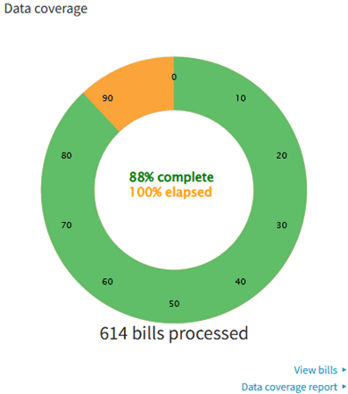
After Enabling Estimations
-
Actual: The percentage of days covered, counting, out of all valid days for which all meters may have data (i.e. are open, not closed), which days actually have bills covering them. Equivalent to ‘Complete’ before enabling estimations.
-
Imputed: Percentage of estimated data (higher number, means lower actual data availability).
-
Remainder: (100% - Actual - Imputed) indicates that there are meters without estimations switched on, which are still leading to data gaps.
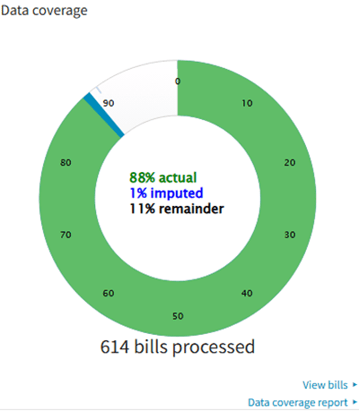
Estimation Methodology
The primary estimation method is based on the ‘average of the past 12 months’ of data. The process adjusts based on data completeness.
Scenario 1: Missing an Entire Month of Data - Coverage Report
-
Example: Estimating data for January 2023, where no data is recorded (red 0 in the Coverage Report).
-
The system analyses data from the past 12 months (January 2022 – December 2022). If any months contain complete data (green tick in the Coverage Report), their average is used as the estimate for the missing month.
-png.png?width=634&height=155&name=image-20250306-212429%20(1)-png.png)
Example consumption calculation:
-
If 4 months out of the past 12 have complete data, the system calculates the average consumption from those 4 months (e.g., 4.5).
-
The estimated consumption for January 2023 would be 4.5.
-
The red "0" in the report changes to a blue checkmark, indicating that data is now available, though estimated.
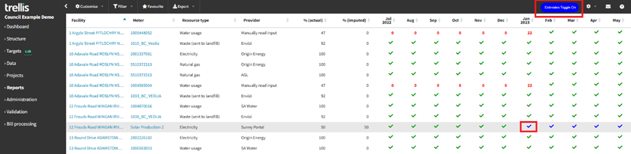
Scenario 2: Partial Data Available
-
Example: March 2023 has data for 5 days out of 31 (red 5 in the Coverage Report), which means it’s missing data for 26 days.
-
The system calculates the average consumption from complete months within the past 12 months and uses this average to estimate the missing days.
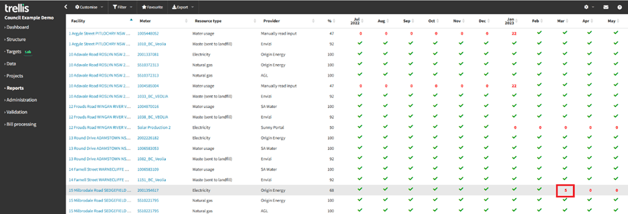
Example consumption calculation:
-
Average consumption from complete months: 6.2.
-
Actual (real) consumption for the 5 recorded days: 2.3.
-
Gap Percentage = (26 missing days / 31 days total) × 100 = 83.9%.
-
Imputed Value = Gap Percentage * Average Amount = 83.9% × 6.2 = 5.2.
-
Projected Total = Actual + Imputed = 2.3 + 5.2 = 7.5.
Guide to symbols on the Coverage Report
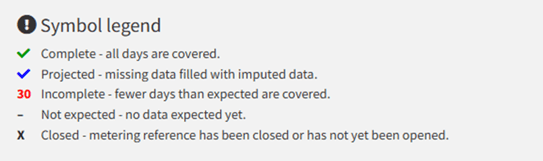
Blue tick indicates: Some or all missing days are estimated based on chosen methodology
Terminology Used in Estimations
-
Actual: The recorded data available for a given period.
-
Imputed: The estimated value used to fill missing data based on historical trends.
-
Projected: The total value combining actual and imputed data
When Will a Meter Not Be Estimated?
A meter’s data will remain incomplete (red in the Coverage Report) if:
-
No complete data is available for any of the past 12 months.
-
The meter has not been configured for estimation.
-
The meter is closed or removed but continues to generate data.
Impact of Enabling Estimations
The estimation process applies to the following types of data:
-
Consumption and Production Data: e.g., electricity, water, gas usage.
-
Emissions Data: Scope 1, 2, and 3 emissions.
-
Cost Data, and more.
Where is Estimation Data Reflected?
-
Dashboard (all data and widgets are impacted, except for the Facility locations map)
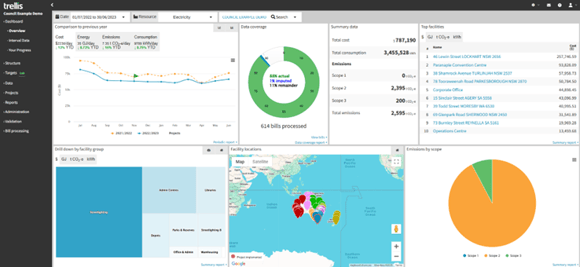
-
Coverage Report (when estimates enabled, the date range is limited to maximum 24 months)
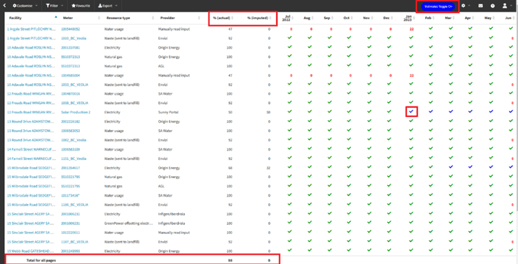
-
Summary Report
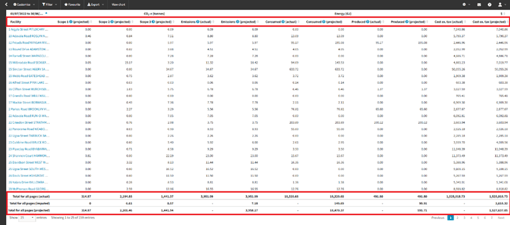
Estimations and Dual Reporting
Does estimation differ based on reporting methodology?
- No, the estimation method remains consistent across all reporting methodologies (Default, Market-Based, and Location-Based), with the methodologies acting as filters in the database.
- While the estimated values may vary depending on the input data, the calculation methodology is the same.
- Estimations are applied dynamically at runtime based on the available data for the selected period, and the reporting methodology does not impact the estimation process, as each methodology applies the same technique to its respective dataset.
Key Takeaways
-
The estimation toggle must be enabled for estimations to apply, but only configured meters are affected.
-
The estimation methodology is always based on the past 12 months of data.
-
Missing data is filled using averages from months with complete data.
-
The impact is visible across dashboard metrics, reports, and visualisations.
-
Estimations apply universally to all types of estimated data.
-
Estimations do not vary by reporting methodology but may differ based on the input data.
-
Estimated data will be replaced with actual data if/when it becomes available in the system.
Note: To understand more about this functionality and get it enabled, please contact our team on support@yourtrellis.com