
Creating a New Facility
- Navigate to the Structure tab in the left navigation bar.
- Open the Facilities page.
- Click New in the top navigation bar to create a new facility.
- Fill in the required facility details, including:
- Facility Group
- Facility Name
- Address
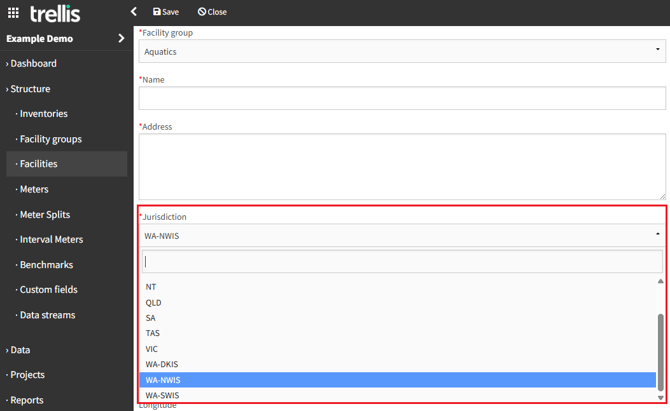
- Jurisdiction
- Other optional fields (these can be left blank or updated later).
- Click Save to complete the facility creation.
- Click Close, to get redirected to the Facilities page, where the newly created facility will appear in the list.
While your facility may not currently use specific resources, selecting the correct jurisdiction is important for potential future electricity and waste water reporting, and emissions factor mapping.
When creating a facility in Western Australia (WA), you need to select the appropriate electrical grid jurisdiction from:
- SWIS (South West Interconnected System) - Covers Perth and southwest WA
- NWIS (North West Interconnected System) - Covers the Pilbara region
- DKIS (Darwin-Katherine Interconnected System) - Covers the northern territory
Same applies to creating a facility in New South Wales (NSW), you need to select the appropriate jurisdiction for the correct factors to be assigned for waste water data:
- NSW - Newcastle
- NSW - Sydney
- NSW - Others
Searching for a Facility
- If you manage a large number of facilities, use the Filter option in the top navigation bar.
- Enter the facility name to quickly locate it.
Updating an Existing Facility
- Locate the facility using the Filter feature or by scrolling through the list.
- Select the facility and click the Edit button.
- Modify any necessary details on the facility page.
- Click Save to apply the changes.
By following these steps, you can efficiently manage facility records, ensuring your data remains accurate and up to date.