
Trellis provides bulk import functionality to simplify the creation of multiple data records at once.
Facility groups, facilities, meters, source data, and benchmark data may all be imported in bulk using a spreadsheet.
To prepare and import the spreadsheet:
-
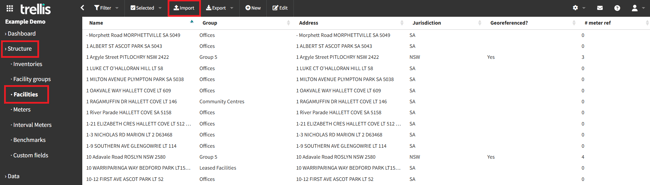
Navigate to the data grid for the relevant data type using the main sidebar menu.
-
Click the Import button in the navigation bar.
-
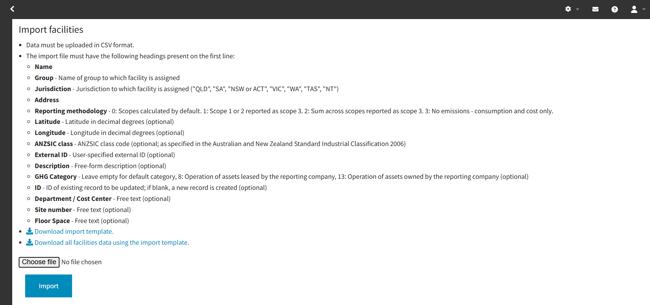
Follow the Download import template link to download a spreadsheet template containing the required columns.
-
Follow the instructions shown to fill in the template spreadsheet's columns. Fields marked as "optional" may be left blank.
-
If any custom fields have been defined for the data being imported, the template will contain columns for these fields. Custom fields are always optional.
-
Save the import spreadsheet and select it using the Choose file button.
-
Click the Import button to import the data.
NOTE: If the spreadsheet contains any invalid values, or is missing required fields, an error message will be shown identifying the problem and the line on which it occurs. In this case, no data will be imported until the spreadsheet is amended and re-imported.