
Background
Organisations often face challenges when reporting emissions from facilities with unclear operational control. Common scenarios include:
-
Facilities owned but not operated by the organisation
-
Shared operational responsibility
-
Leased assets
-
Outsourced operations
Overview
To address these complexities, we have introduced a new feature that enhances facility level emissions reporting within Scope 3. This feature provides flexible reporting methodologies to ensure accurate carbon accounting for facilities with varying degrees of operational control.
Key Features
-
Facility-level configuration
-
Four distinct reporting methodologies:
-
Scopes Calculated by Default
-
Sum Across Scopes Reported as Scope 3
-
Scope 1 or 2 Reported as Scope 3
-
No Emissions – Consumption and Cost Only
-
-
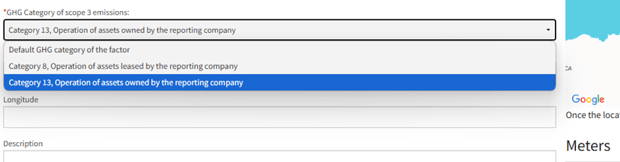
Flexible GHG category assignment for Scope 3 emissions
-
Default GHG category based on emission factors
-
Category 8: Operation of assets leased by the reporting company
-
Category 13: Operation of assets owned by the reporting company
-
-
Daily calculation updates across reports
Reporting Methodologies
Scopes Calculated by Default
-
Applies standard emission factors
-
Separately calculates and reports Scope 1, 2, and 3 emissions
-
Ideal for facilities with clear operational control
Sum Across Scopes Reported as Scope 3
-
Consolidates all emissions (Scope 1, 2, and 3) into Scope 3
-
Provides a comprehensive emissions total
-
Ensures consistent reporting for facilities with shared operational responsibility
Scope 1 or 2 Reported as Scope 3
-
Moves Scope 1 and 2 emissions into Scope 3
-
Maintains existing Scope 3 emissions separately
-
Ensures compatibility with historical reporting methods
No Emissions – Consumption and Cost Only
-
Tracks usage and cost data without calculating emissions
-
Useful for resource consumption monitoring
-
Supports data tracking with no emissions impact
Note: All figures and calculations shown below are simplified examples for demonstration purposes only and do not represent actual facility emissions data.
Base Facility Example: Manufacturing Plant
Annual Base Data:
Activities and their Emissions:
-
Natural gas: Scope 1 (800) + associated Scope 3 (100)
-
Diesel: Scope 1 (200) + associated Scope 3 (50)
-
Electricity: Scope 2 (500) + associated Scope 3 (150)
-
Stand-alone Scope 3: Waste (200) + Employee commuting (100)
- Scopes Calculated by Default
|
Emissions Source |
Scope 1 |
Scope 2 |
Scope 3 |
Total |
|
Natural Gas |
800 |
- |
100 |
900 |
| Diesel |
200 |
- |
50 |
250 |
|
Electricity |
- |
500 |
150 |
650 |
|
Waste |
- |
- |
200 |
200 |
|
Employee Commuting |
- |
- |
100 |
100 |
|
Total |
1,000 |
500 |
600 |
2,100 |
- Sum Across Scopes Reported as Scope 3
|
Emissions Source |
Scope 1 |
Scope 2 |
Scope 3 |
Total |
|
Natural Gas |
- |
- |
900 |
900 |
|
Diesel |
- |
- |
250 |
250 |
|
Electricity |
- |
- |
650 |
650 |
|
Waste |
- |
- |
200 |
200 |
|
Employee Commuting |
- |
- |
100 |
100 |
|
Total |
0 |
0 |
2,100 |
2,100 |
-
Scope 1 or 2 Reported as Scope 3
|
Emissions Source |
Scope 1 |
Scope 2 |
Scope 3 |
Total |
|
Natural Gas |
- |
- |
800 |
800 |
|
Diesel |
- |
- |
200 |
200 |
|
Electricity |
- |
- |
500 |
500 |
|
Waste |
- |
- |
200 |
200 |
|
Employee Commuting |
- |
- |
100 |
100 |
|
Total |
0 |
0 |
1,800 |
1,800 |
Implementation Guide
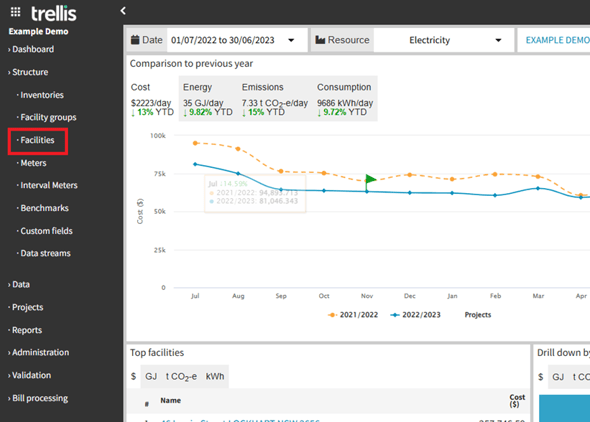
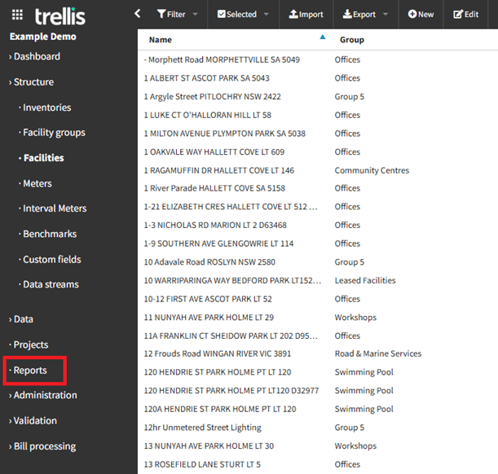
Navigate to Facilities
-
Log into your account
-
Locate the ‘Facilities’ tab in the side navigation bar.
Select a Facility
-
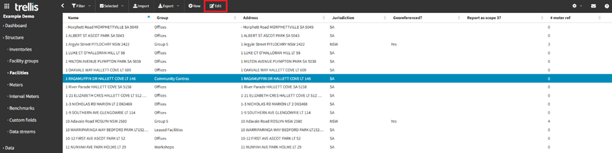
From the facilities list, identify your target facility
-
Click the ‘Edit’ button in the top navigation bar
-
The facility configuration page will open
Select Reporting Method
-
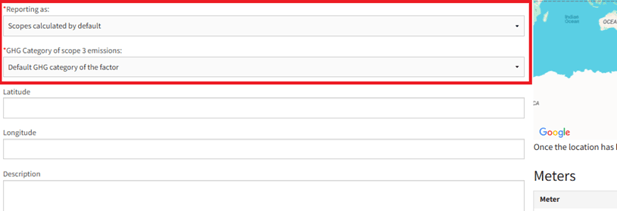
Locate the ‘Reporting as’ section
-
Click the dropdown menu and choose from the 4 available options
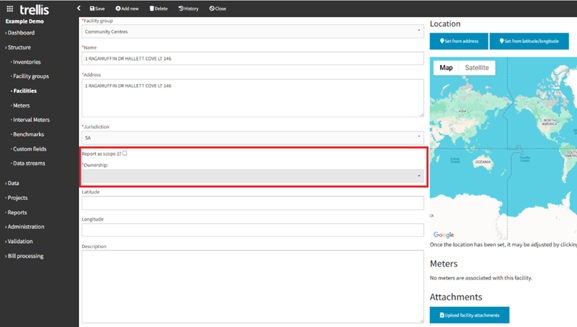
Before the new feature:
After the new feature:
-png.png?width=616&height=206&name=image-20250403-003638%20(1)-png.png)
Note: The ‘Scope 1 or 2 reported as Scope 3’ option maintains compatibility with the previous ‘Report as Scope 3’ functionality we had before.
GHG Category Selection
-
Find ‘GHG Category of Scope 3 emissions’ section
-
Click the dropdown menu and select the appropriate category
-
Click the ‘save’ button from the top navigation bar to apply your changes.
-
Click ‘close’ button to exit the configuration page
Important Note: Changes require up to 24 hours to take effect due to regular overnight calculation processes.
View Updated Reports
-
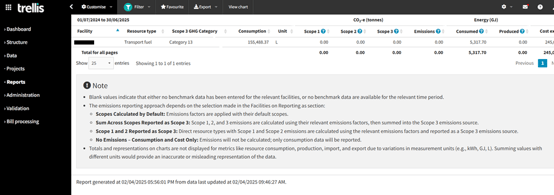
Navigate to "Reports" tab in sidebar
-
Select relevant report (e.g., ‘summary report’) and review the updated emissions calculations
Additional Resources
Climate Active Technical Guidance Manual: Covers emissions calculations, Scope 3 reporting, and carbon neutral certification.
National Greenhouse and Energy Reporting (NGER) Scheme: Provides official methodologies for reporting greenhouse gas emissions in Australia.
National Greenhouse and Energy Reporting Scheme | Clean Energy Regulator
Australian National Greenhouse Accounts (NGA) Factors: Offers emissions factors for Scope 1, 2, and 3 calculations.
National Greenhouse Accounts Factors - DCCEEW
Australian Government Department of Climate Change, Energy, the Environment and Water (DCCEEW): Provides emissions estimation tools and regulatory guidance.Climate change - DCCEEW
Note: For more information on this functionality, please contact our team on support@yourtrellis.com