This documentation focuses on features specific to the Bill Exceptions Report. For information about standard reporting capabilities (like customisation, filtering, exporting, etc.), please refer to the General Reporting Guide.
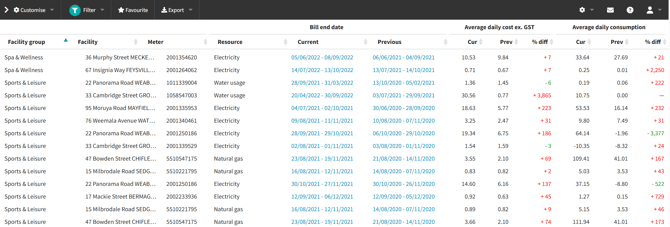
The Bill Exceptions Report identifies significant variations between current and previous billing periods by comparing utility costs and consumption data. It helps users quickly identify unusual patterns or potential billing anomalies.
Bill Exceptions are primarily designed for Finance / Accounts Payable.
This report does not replace your Finance or Invoices modules, but it offers a quick way to spot suspect bills using an exception threshold.
Designed to catch:
-
Price hikes
-
Abnormal cost and consumption spikes
-
Other billing anomalies that may need investigation or supplier follow‑up
Core Functionality
-
Compares most recent bill against previous year's equivalent period (or best available comparison data)
-
Uses daily averages to normalise comparisons
-
Threshold-based flagging system
Calculations
-
Average Daily Cost = Total Cost ÷ Period Days
-
Average Daily Consumption = Total Consumption ÷ Period Days
-
Variations calculated against previous year's data
Configuration Options
The default settings for this report are slightly different compared to the other reports:
-
Unlike other reports where filter options dynamically change based on customisation selections, this report maintains fixed essential columns. While these columns can be customised, they cannot be removed as they are fundamental to the report's functionality.
-
The report operates at bill-level granularity rather than monthly aggregation, allowing for direct comparison between individual billing periods.
Customise
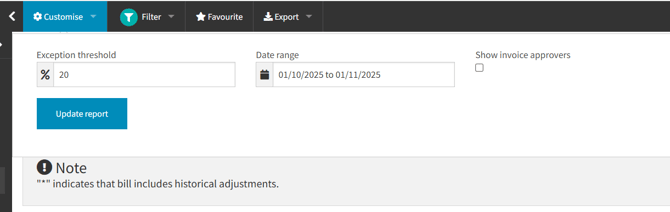
Exception Threshold
-
If there is higher % difference than the set value detected in a metric, the bill will be displayed in the report result.
-
Default: 20%
-
Adjustable percentage to filter variations
-
Applied to both cost and consumption values
-
Bills appear if either cost OR consumption exceeds the threshold → Bills may appear with one metric below threshold
Date Range
-
Nominates a date range to filter for the bills you want to check. If any day of the supply period for a bill falls within your selected date range, it will display in the results.
-
Default: One month period from the current date backwards
-
Customisable period selection
-
Recommended maximum: 12-month period
-
Note: Longer periods may affect performance
Invoice approvers toggle
-
Adds a column to the results displaying the name of the nominated invoice approver for each bill in that line (if configured), to facilitate follow up with the relevant person.
-
Enable / disable based on your needs
-
Only available / applicable to users with the invoice approval feature enabled
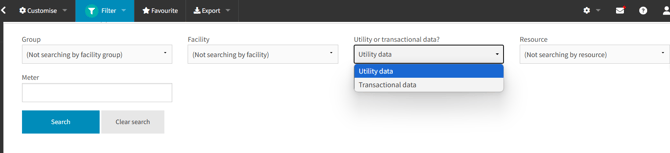
Filter
-
Group/Facility selection (based on the Facility Groups and Facilities in your inventory)
-
Data Type Selection
-
Utility data: For continuous supply periods (e.g., electricity, water)
-
Transactional data: For irregular supply periods (e.g., fuel)
-
-
Resource type filter (based on the resources for which there are bills in your inventory)
-
Meter search (Type in a full or partial meter reference to match on)