
Trellis does its best to empower you in managing your own data. Trellis allows you to create and delete your data.
This can be done in key areas of Trellis such as:
-
Structure
-
Inventories
-
Facility Groups
-
Facilities
-
Meters
-
Benchmarks
-
Custom Fields
-
Data Streams
-
-
Data
-
Source Data
-
Benchmark Data
-
-
Administration
-
Users
-
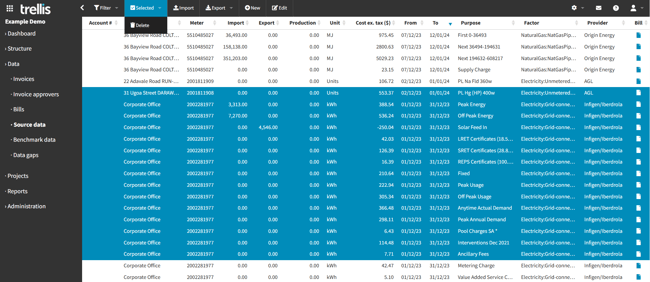
To delete data in Trellis, navigate to the desired table using the main menu panel on the left of screen.
-
Select the records that you want to delete. Hint - To select multiple consecutive records, hold Shift + click. To select multiple non-consecutive records, hold Ctrl + click.
-
Once the records have been selected, go to the Selected tab on the tool bar at the top of the table and click Delete.
-
A confirmation dialog box will appear to confirm the deletion of the selected records, click OK.
NOTE: All the data mentioned above can be deleted by a user with appropriate permissions. However data read from bills and other sources can’t be edited by a non-admin.
NOTE: Deleting bills cannot be done by users since these are automatically uploaded to the system. If the need arises, lodge a support request.