
Facility groups may contain multiple facilities. Facilities represent physical sites and may be positioned on a map.
Facilities have the following properties:
-
Facility group - The facility group to which the meter belongs.
-
Name - A descriptive name identifying the facility. Facility names must be unique; the same name cannot be repeated within an inventory.
-
Address - Street address of the facility.
Each unique facility can only have a single address. There may be 2 meters on the facility and the meters may be located at 2 separate locations, e.g. opposite corners of the facility with different street address. Only 1 address can be added in that case.
-
Jurisdiction - Determines, for emissions reporting purposes, the emissions factor to be used for source data points contained within the facility's meters.
-
Reporting as:
-
Scopes Calculated by Default: Standard calculation applying appropriate emission factors for each scope.
-
Sum Across Scopes Reported as Scope 3: Consolidates all emissions into Scope 3.
-
Scope 1 or 2 Reported as Scope 3: Moves Scope 1 and 2 emissions to Scope 3 while maintaining existing Scope 3 emissions separately.
-
No Emissions – Consumption and Cost Only: Tracks usage and cost data without calculating emissions.
-
-
GHG Category of Scope 3 emissions:
-
Default GHG category of the factor: based on emission factors
-
Category 8: Operation of assets leased by the reporting company
-
Category 13: Operation of assets owned by the reporting company
-
(see Supplementary Guideline: Operational Control)
For more details on the reporting options see Scope 3 Facility Emissions Reporting.
-
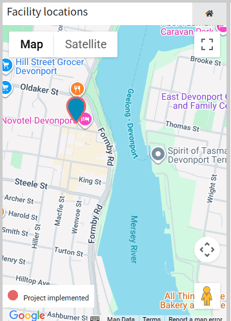
Latitude/longitude (optional) - Decimal latitude and longitude co-ordinates indicating the facility's location. If exact co-ordinates are not known, the Set from address button can be used to automatically guess the position by geocoding the address.
For the facility location pin to appear in the dashboard map, there needs to be some data allocated to at least one meter within that facility.
-
Description (optional) - An informative description explaining the function of the facility.
-
ANZSIC division, subdivision, group, and class (optional) - The Australian and New Zealand Standard Industrial Classification (ANZSIC) for the facility, if different to the inventory's ANZSIC classification. Required for reporting under the National Greenhouse and Energy Reporting (NGER)
-png.png?width=650&height=296&name=image-20250529-065317%20(1)-png.png)
Next Steps
-
Facilities belong to facility groups. Read more about facility groups.
-
Facilities may contain any number of meters. Read more about meters.
-
Need to add or edit facility details? Read about how to add or edit data records.
-
Need to add a number of facilities at once? Read about importing data in bulk.