
The highest level in the data structure, an inventory typically contains all data belonging to an organisation. Only data in the current active inventory are displayed and reported on.
An organisation will typically have one main inventory containing its primary reporting data, but may have multiple secondary inventories.
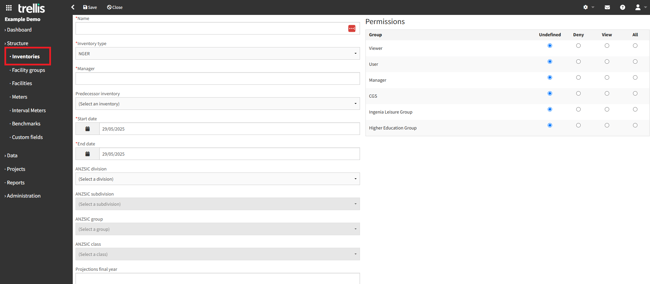
Inventories have the following properties which are initially set up as part of the onboarding process:
-
Name - A descriptive name uniquely identifying the inventory.
-
Inventory type - Determines which scopes are included when calculating emissions in reporting.
-
NGER - Excludes scope 3 emissions from reporting.
-
All other options (Climate Active, Malaysia, New Zealand, NCOS, OtherA, ZeroC) - Include scope 3 emissions in reporting.
-
Note: This field will only appear while creating a new inventory, as it cannot be edited after creation.
-
Manager - The name of the person responsible for managing this inventory.
-
Predecessor inventory - Used only for comparison reports.
-
Start date - Earliest date for which source data may appear in the inventory.
-
End date - Latest date for which source data may appear in the inventory.
-
ANZSIC division, subdivision, group, and class - The Australian and New Zealand Standard Industrial Classification (ANZSIC) for the inventory. Required for reporting under the National Greenhouse and Energy Reporting (NGER) scheme.
Next Steps
-
Inventories may contain any number of facility groups. Read more about facility groups.
-
Need to add or edit inventory details? Read about how to add or edit data records.