
Overview
The new Account Switching feature allows users with multiple client accounts to easily switch between different organisations without logging out and back in. This streamlined access is particularly useful for consultants and users who manage multiple client portfolios.
Initial Login
-
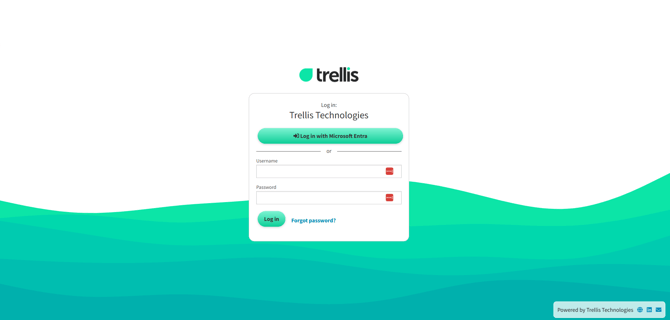
Navigate to the Trellis login page
-
Log in with the method configured for your account.
-
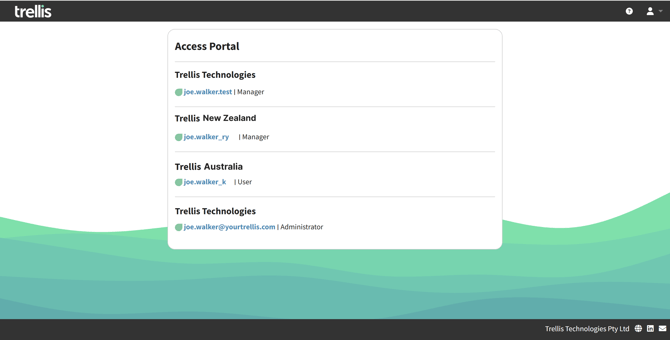
If you have multiple accounts associated with your email address, you'll be automatically directed to the Access Portal, otherwise the login proceeds as normal.
Access Portal displays
-
A list of all organisations you have access to
-
Your role in each organisation account
-
Your associated username (usually same as email address) for each account
Switching Between Accounts
-
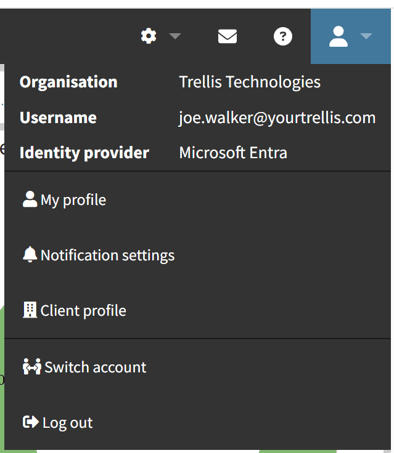
From any page in Trellis, click on your profile icon in the top-right corner
-
View your current organisation and username in the dropdown menu
-
Click "Switch account" to return to the Access Portal
-
Select the desired organisation to switch to that account
Important Notes
-
Your email address can be associated with multiple organisations
-
You might have different permission levels in each of those
-
All your data and settings are preserved when switching between accounts
-
You can have two logins (user names) set up for the same organisation with different access permissions (be assigned to various user groups), if needed
To understand more about this functionality and check if it applies to your organisation settings, please contact our team on support@yourtrellis.com