
This documentation focuses on features specific to the NGER Report. For information about standard reporting capabilities (like customisation, filtering, exporting, etc.), please refer to the General Reporting Guide.
Overview
The National Greenhouse and Energy Reporting (NGER) Report structures data for entry into the Emissions and Energy Reporting System (EERS). It serves as an essential cross-check mechanism with the EERS manual importing process, focusing exclusively on scope 1 and 2 emissions.
The report is pre-configured, with data that is is aggregated by NGER measurement criterion and automatically converted to EERS-compatible units.
For a more detailed explanation on NGER reporting, please refer to Methods and measurement criteria guideline document.
Report Structure
-
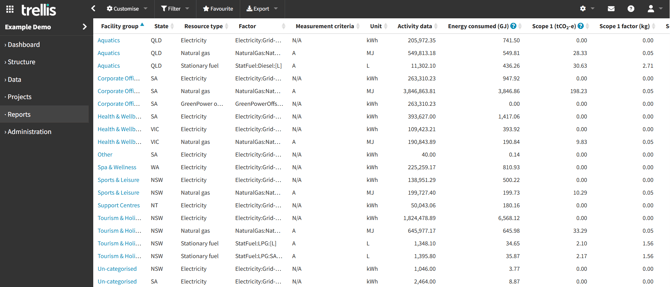
Facility Group - As defined in your inventory structure
-
State - Based on your facility settings
-
Resource Type
-
Factor - The emission factor used for each resource type
-
Measurement criteria (for detailed explanation on each criterion refer to this guideline)
-
Unit - Always converted to units appropriate for entry to EERS per resource type
-
Activity data - Total consumption within the reporting period. In the case of electricity, it is the total amount imported from the grid.
-
Energy consumed (GJ) - Consumption of energy, in relation to a facility, means the use or disposal of energy from the full operation of the facility.
-
Scope 1 and 2 emissions and factors
Hovering over the ? in the heading columns will display relevant information for each and links to the relative regulations / guidelines
Customise
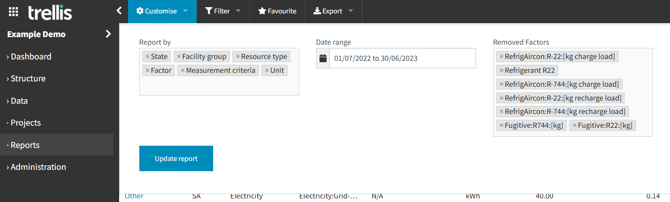
The default customisation options align with NGER Report formats. Exclusions are set at a global level for all customers based on the standard NGER requirements. You may see factors and resources in the exclusions list that are not applicable to your inventory. If you don’t have the removed factors in your inventory, resetting the field will not change anything in your report.
This Report is part of our enhanced reporting add on features. To learn more about accessing these capabilities, please reach out to our support team.