
This documentation focuses on features specific to the TEFMA Report. For information about standard reporting capabilities (like customisation, filtering, exporting, etc.), please refer to the General Reporting Guide.
Purpose
The TEFMA Report provides energy consumption and greenhouse gas emission data categorised according to TEFMA (Tertiary Education Facilities Management Association) standards, enabling standardised reporting across educational institutions.
Report Structure
-
Resource type
-
Factor - The emission factor used for each resource type
-
Activity data - Total consumption within the reporting period. In the case of electricity, it is the total amount imported from the grid.
-
Unit Measure - Factor unit
-
Energy consumed (GJ) - Consumption of energy, in relation to a facility, means the use or disposal of energy from the full operation of the facility.
If the Solar Production (kWh) value is zero: Energy consumed (GJ) = Converted value of Activity data
If the Solar Production (kWh) value is NOT zero: Energy consumed (GJ) = Converted value of Activity data (energy imported) + Solar Production (energy produced)
💡The energy conversion (to GJ) only applies to resource types that have direct energy consumption, such as natural gas or electricity.
For activities like staff commute or other non-energy resource types, the activity data is tracked for emissions calculations, but they don't have an associated energy factor, hence showing as 0 GJ. Examples include:
-
Staff commute (measured in km but no direct energy consumption)
-
Waste disposal (measured in tonnes but no energy factor)
-
Water consumption (measured in kL but no energy conversion)
-
Solar Production (kWh) - Total resource production, including both on-site consumption and grid export, measured at the point of generation
-
Combined scope 1 and 2 emissions (t CO2-e)
-
Separate Scope 3 emissions (t CO2-e)
-
Total cost ex tax ($)
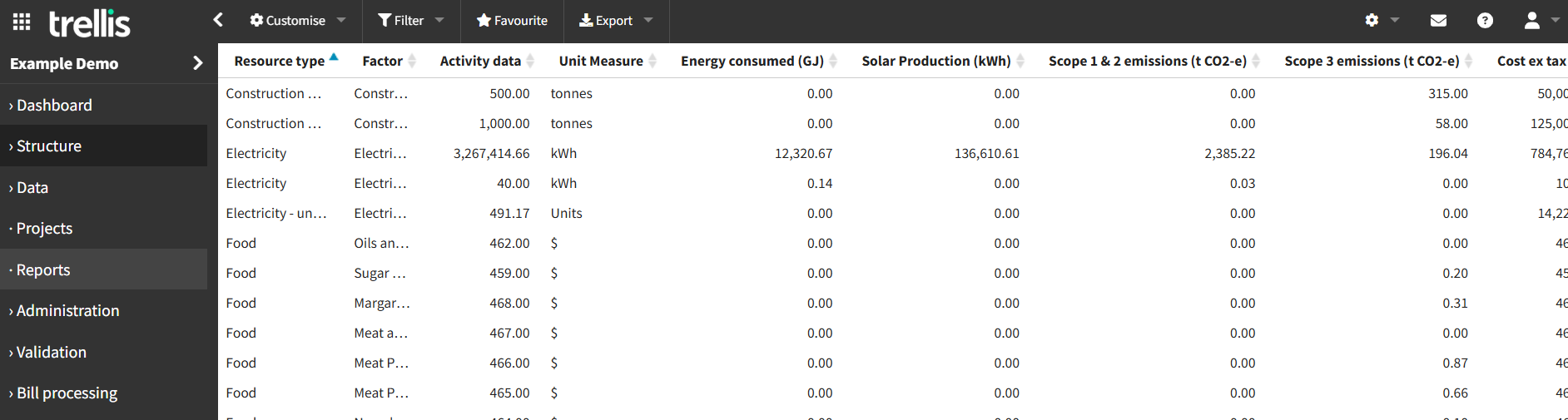
The standard report format has been configured to align with TEFMA reporting requirements. Users can utilise the filtering and customisation features to perform detailed analysis and create more specific views of the data as needed.
This Report is part of our enhanced reporting add on features. To learn more about accessing these capabilities, please reach out to our support team.